LuxOS Mail
A light, fast desktop mail app for LuxOS. Your mail stays on your computer.
Preview: LuxOS Mail is available only in the LuxOS staging channel. The e-mail app of LuxOS is Mozilla Thunderbird – see E-mail – Thunderbird.
LuxOS Mail (shown as Mail in LuxOS) is a preview mail client for LuxOS, a free Linux distribution. It is written in LSL, runs entirely on your computer and connects directly to your mail provider over IMAP. It works with Gmail and Google Workspace, Outlook.com and Microsoft 365, Seznam, LuxAI mailboxes and any other IMAP mailbox.
What it does
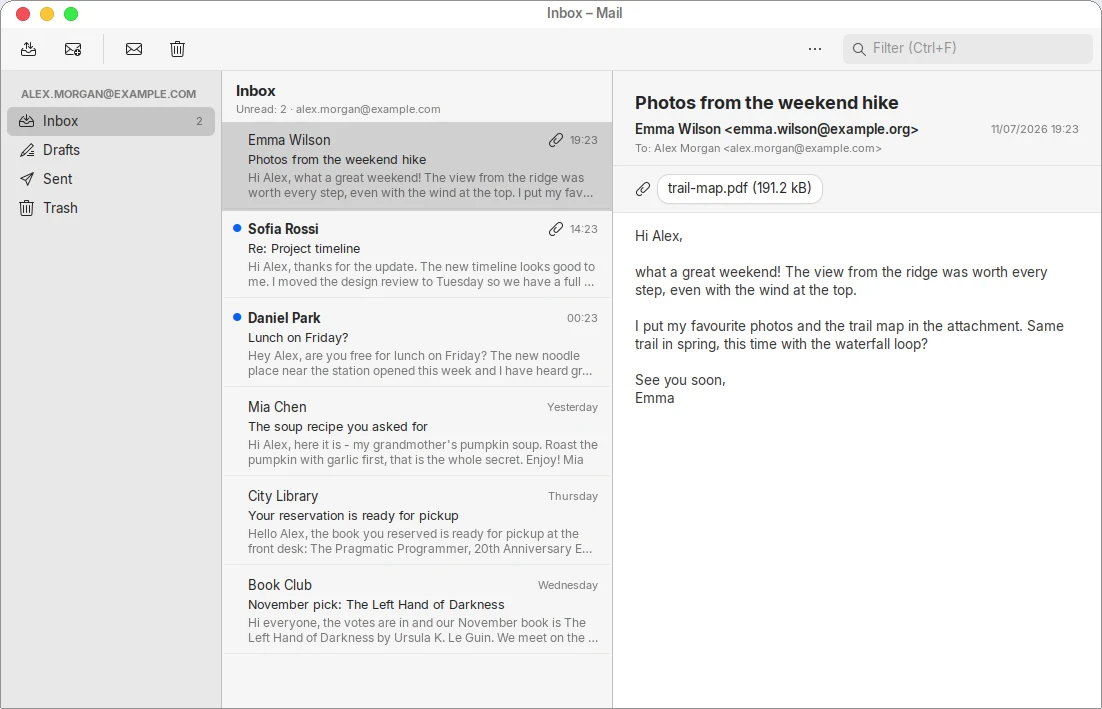
- Reads your mail from any IMAP mailbox, with folders (Inbox, Sent, Drafts, Trash, Gmail labels and your own folders), unread counts and a quick filter.
- Instant notifications about new mail (IMAP IDLE) – even when the window is closed.
- Works offline: messages you have downloaded stay readable without internet.
- Safe by default: HTML mail is shown as text without remote content, so senders cannot track when you read their message. Attachments are saved only when you choose to.
- Simple setup: type your address and Mail finds the server settings itself. For Gmail and Microsoft accounts you sign in with your provider in your web browser – Mail never sees your password.
- Mark messages as read or unread and move them to Trash. Writing and sending messages will come in a later version.
Sign in with Google
For Gmail and Google Workspace addresses, LuxOS Mail offers Sign in with Google. Your web browser opens Google's own sign-in and consent page; after you approve, Google returns a token to LuxOS Mail on your computer, and Mail uses it to connect to imap.gmail.com.
LuxOS Mail asks Google for:
https://mail.google.com/– access to your Gmail mailbox over IMAP (and SMTP for sending later). Google offers IMAP access only with this scope, so a full mail client needs it.openidandemail– your e-mail address, to check which account you signed in with.
Your data stays with you
- Your mail, your address and your sign-in token are stored only on your computer (mail in your home folder, the token in your encrypted keyring).
- LuxOS Mail talks to Google directly. No data from your Google account is ever sent to LuxOS servers or to anyone else, and nobody at LuxOS can read your mail.
- Google user data is used only to show and manage your mail in the app – never for ads, never sold, never used to train AI models.
- Removing the account in Mail deletes the local copy and the token and revokes Mail's access at Google. You can also revoke access any time at myaccount.google.com/permissions.
Details are in the Privacy Policy. LuxOS Mail's use and transfer to any other app of information received from Google APIs will adhere to the Google API Services User Data Policy, including the Limited Use requirements.
Get LuxOS Mail
LuxOS Mail is installed with LuxOS (package luxos-mail) and is free and open source under the GPL-3.0-or-later license. Download LuxOS, or install it on LuxOS with lux install luxos-mail.
Contact
Developer: Antonín Tomeček (LuxOS). Questions, support and privacy requests: info@lux-ai.cz.