LuxOS vs elementary OS
elementary OS and LuxOS are the two Linux systems most often recommended to people who like the Mac's calm, simple style. They get there in different ways. A fair comparison – elementary OS is the more mature of the two, LuxOS is younger.
At a glance
| LuxOS 1.0.3 | elementary OS 8.1 | |
|---|---|---|
| Base | Arch Linux, rolling release | Ubuntu LTS with Ubuntu's hardware enablement stack (Linux 6.14, Mesa 25 in 8.1) |
| Desktop | Xfce components arranged like macOS: top bar, Dock, Launchpad, Search, Control Center | its own Pantheon desktop shell (Gala, Panel, Dock); the Wayland-based Secure Session is the default |
| Design | a close copy of the Mac's way of working (window buttons on the left, Mac-style shortcuts) | its own Mac-inspired design language with its own apps |
| Apps | LuxOS Store: Arch repositories, Flathub, checked community packages (AUR) in a sandbox | AppCenter – a pay-what-you-can store for indie developers – plus Flathub |
| Price | free | pay what you can (any amount) |
| Hardware | 64-bit PC (x86_64), 4 GB RAM, 20 GB disk; UEFI or BIOS | recommended: recent Intel Core i3 or comparable dual-core 64-bit CPU, 4 GB RAM, SSD with 32 GB free, 1024 × 768 display; also ARM64 builds for UEFI devices |
| Extras | automatic driver detection, Lux Guard, Safe (encrypted folder), optional LuxAI assistant | a coherent set of its own apps |
| ISO size | 2.4 GB | 3.3 GB (8.1.1) |
| Maturity | young (stable since 1.0.3), one developer | mature, more than a decade of releases, team and community |
Where elementary OS is the better choice
- Polish and coherence. elementary designs its desktop and apps together; the whole system feels consistent.
- Stability. An Ubuntu LTS base changes slowly, which suits computers that must not surprise anyone.
- Maturity and community. Years of releases, a team behind it and plenty of help online. LuxOS is young.
- ARM devices. elementary OS offers ARM64 builds; LuxOS is x86_64 only.
Where LuxOS differs
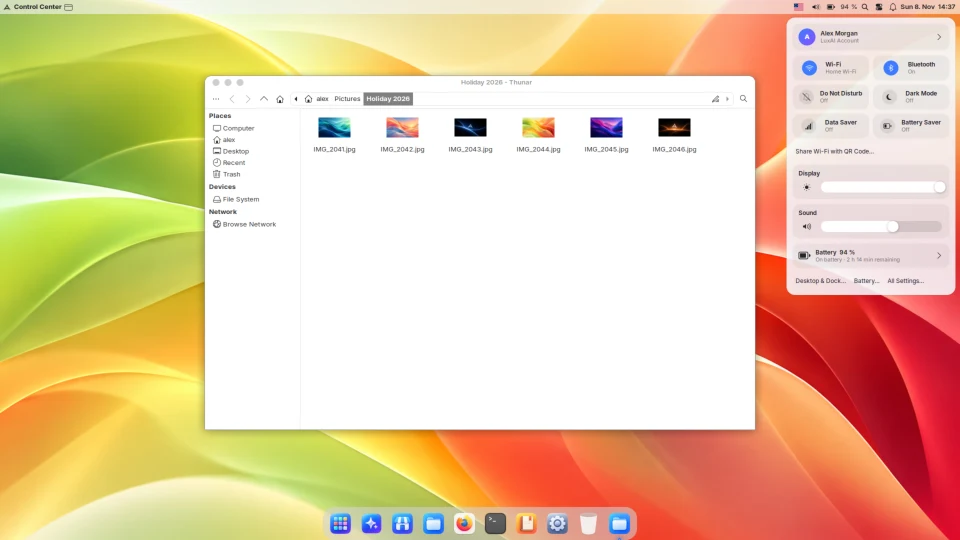
- Closer to the Mac layout: a top bar with the active app's name, a Dock with magnification, Launchpad, Control Center, red-yellow-green window buttons on the left and Super in the role of Cmd.
- A lightweight Xfce base that suits older PCs, including ones with legacy BIOS.
- Huge software choice: the full Arch Linux repositories and Flathub; community (AUR) packages are checked and installed in a sandbox.
- Safety net for updates: a Btrfs snapshot before each update and rollback from the boot menu.
- Automatic drivers for NVIDIA by generation, Broadcom Wi-Fi, Intel cameras and audio.
Who should pick which?
Pick elementary OS if you want a calm, carefully designed system that changes slowly and you value its own apps. Pick LuxOS if you want the Mac way of working as closely as possible, newer software with snapshots behind every update, or a lighter system for an older PC – and you are fine with a young system. Both can be tried from a USB stick without installing.
Sources
- elementary OS – official website (version 8.1.1, pay what you can, AppCenter)
- elementary OS 8.1 Available Now (Ubuntu LTS hardware enablement stack, Secure Session by default, Flathub, ARM64)
- elementary OS installation – recommended system specs
- elementary OS open source (Pantheon desktop shell: Gala, Panel, Dock)
- LuxOS: LuxOS compared with other distributions, the LuxOS desktop
Facts about elementary OS checked on the official website on 18 November 2026. Details change between releases.