LuxOS vs Zorin OS
Both make Linux friendly for people coming from Windows or macOS. Zorin OS is a mature, polished system on Ubuntu LTS; LuxOS is a young, free Arch-based system with a macOS-like desktop by default. A fair comparison – LuxOS is young, and we say where Zorin OS is the better choice.
At a glance
| LuxOS 1.0.3 | Zorin OS 18 | |
|---|---|---|
| Base | Arch Linux | Ubuntu 24.04 LTS |
| Release model | rolling: continuous updates, numbered ISO snapshots | fixed release; updates and security patches until at least June 2029, a new major version about every two years |
| Desktop | Xfce components in a macOS-like layout: top bar, Dock, Launchpad, Control Center | GNOME Shell with Zorin's layouts (Lite edition: Xfce) |
| macOS-like layout | default, free | only in the paid Pro edition (Core has 4 layouts: Windows-like, Windows List-like, Touch and GNOME Shell-like; Pro has 12) |
| Price | free, no paid edition | Core, Lite and Education free; Pro is a one-time payment with extra apps, layouts and installation support |
| Minimum hardware | 64-bit CPU, 4 GB RAM, 20 GB disk | 1 GHz dual-core 64-bit CPU, 2 GB RAM, 15 GB disk (Core), 800 × 600 display |
| Apps | LuxOS Store: Arch repositories, Flathub, checked community packages (AUR) in a sandbox | built-in Software store with thousands of apps |
| Windows apps | Wine through the Bottles app | built-in Windows App Support (double-click .exe and .msi installers) |
| Drivers | detected automatically during and after installation (NVIDIA by generation, Wi-Fi, audio, cameras) | NVIDIA, AMD and Intel graphics drivers included |
| AI assistant | optional LuxAI (account with monthly limits) | – |
| Maturity | young (stable since 1.0.3), one developer, public since October 2026 | mature, many years of releases, large user base |
Where Zorin OS is the better choice
- Stability and long support. A fixed Ubuntu LTS base with updates promised until at least June 2029 – fewer changes, fewer surprises.
- Maturity. Zorin OS has years of releases, a large community and many guides. LuxOS is young.
- Windows apps. Windows App Support is integrated more deeply than in LuxOS.
- Very old or weak hardware. Zorin OS lists 2 GB of RAM as the minimum and has a Lite edition; LuxOS is tested from 4 GB.
- Paid support. Zorin OS Pro includes installation support; LuxOS has no paid support.
Where LuxOS differs
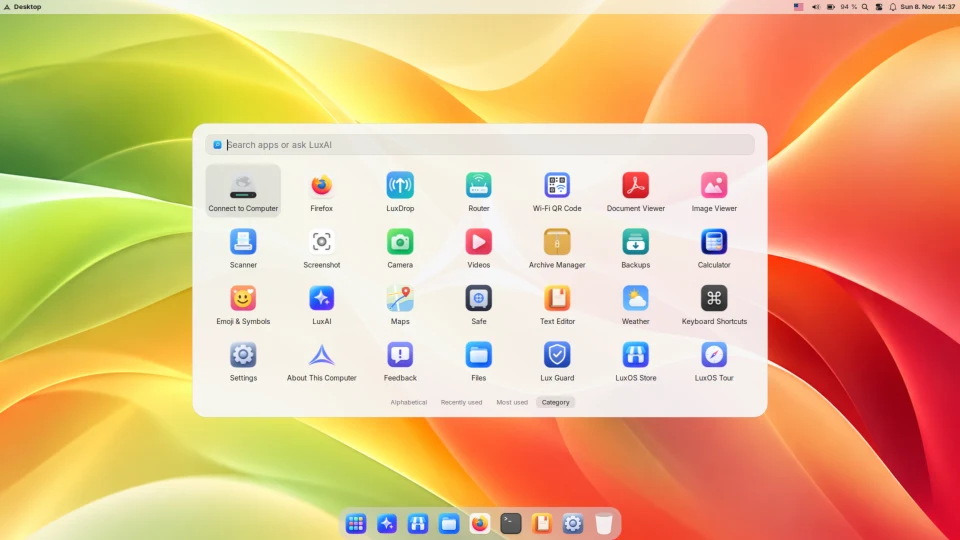
- macOS-like desktop for free, finished out of the box – top bar, Dock with magnification, Launchpad, Control Center and Mac-style shortcuts.
- Newer software soon after upstream releases thanks to the Arch base, without a big upgrade every two years.
- Updates you can undo: a snapshot before each update, and rollback from the boot menu if something breaks.
- Its own tools: the
luxpackage manager, Lux Guard for programs downloaded from the internet, automatic hardware detection and the optional LuxAI assistant.
Who should pick which?
Pick Zorin OS if the computer must simply work for years, if you want a Windows-like layout or paid help, or if you rely on Windows programs. Pick LuxOS if you want a Mac-like desktop without paying for it, like new software with a safety net, and are fine with a young system. Not sure? Both run from a USB stick without installing – try each for an afternoon.
Sources
- Zorin OS – official website (editions, support until June 2029, Windows App Support, drivers)
- Zorin OS 18 – technical details (Ubuntu 24.04 LTS base, GNOME Shell, Lite with Xfce)
- Zorin OS Pro (layouts in Core and Pro, what Pro adds)
- Zorin OS system requirements
- LuxOS: LuxOS compared with other distributions, hardware support
Facts about Zorin OS checked on the official website on 18 November 2026. Details change between releases.